A classroom robot can read a story aloud, guide a coding task, or let an absent student join a lesson from home. Its value comes from the job it does, not from having a screen, wheels, or a human-shaped shell.
If you’re deciding where a robot could fit in a school, start with the lesson and the teacher’s workload. The hardware comes after that.
Quick read
- Robots can give students a physical way to test code, sensors, and movement.
- Telepresence robots can connect remote students to lessons and classmates.
- Teachers still need control over timing, safety, data, and learning goals.
The robot becomes part of the lesson
Educational robots change classroom work when students can act on a physical system and see the result. A program can tell a robot to turn, stop, follow a line, or move an arm. The student then checks what happened and adjusts the code.
That loop makes an abstract idea visible. A mistake in a text editor may look harmless; a robot that turns too early shows the error in a way students can inspect. The teacher can then discuss the code, the sensor input, and the robot’s movement in the same lesson.
This approach fits coding, engineering, and science classes. It can also connect subjects: students may write instructions, measure movement, explain the result, and record changes in a report. The robot is the test object that ties those steps together.
The hardware does not remove the need for teaching. Fixed activities may keep students busy without helping them understand why the activity works. The task needs a clear question and a result students can check.
More students can take part
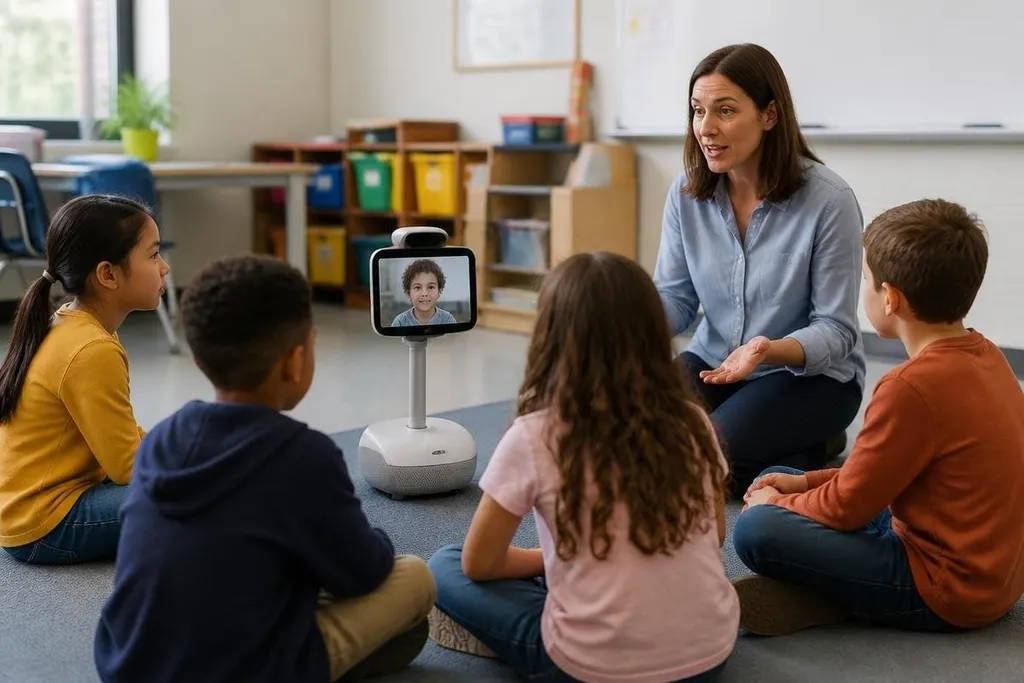
Some robots are made for direct classroom work. Others act as a remote presence. A telepresence robot carries a camera, microphone, speaker, and screen, letting a student attend from another place while they move through the room.
That can help when a student cannot attend in person for a period of time. The useful part is the two-way link: the student can see the teacher, hear classmates, and take part in a discussion instead of watching a recording alone.
The setup still depends on the school’s network, room layout, and class rules. If the connection drops or the camera cannot see the whiteboard, the teacher gets more work. The school also needs a plan for charging, storage, repairs, and access to the device.
A teacher comparing classroom robots can use Robot24.com to read about what these machines do in schools and other workplaces. That wider view helps connect lessons on sensors, control, and coding to jobs in factories, labs, hospitals, and public services. The teacher still decides when the robot speaks, moves, or stops.
Teachers keep the control
The system can repeat instructions, collect a sensor reading, or give a learner another chance to run a task. It cannot decide what a class needs without rules set by the teacher.
Teachers still choose the goal, explain the idea, check the work, and decide when the robot adds value. They also need to know what data the robot records. A camera or microphone can raise privacy questions, especially when children are involved.
Cost affects the choice too. The purchase price is only one part of the work. Schools may need spare batteries, replacement parts, software access, training time, and a staff member who can fix basic faults.
I’d choose a robot that supports one clear lesson before buying a device with more features than the class can use.
A practical school checklist
Use these questions before a purchase or trial:
- Name the lesson: What will students understand or make with the robot?
- Check the room: Can the robot move, charge, and operate safely in the space?
- Test teacher control: Can staff pause the task, change settings, and reset the robot quickly?
- Plan for faults: Who handles a dead battery, broken part, lost connection, or software problem?
- Review data: What does the robot collect, where is it stored, and who can access it?
- Count the full cost: Include training, repairs, accessories, and software fees.
A small trial can answer more useful questions than a large order. Run the same lesson with the robot, watch where students need help, and record the time the teacher spends setting up and fixing problems.
Educational robots will earn a lasting classroom role when they make a hard idea easier to test, give a remote student a real way to join, or let a teacher spend more time on explanation. The next decision is practical: which lesson will the robot improve, and who will keep it working after the first week?